Cold Email Personalization at Scale: The System Behind 10-15% Reply Rates
Outbound Automation
Cold Email Personalization at Scale | B2B Guide 2026
How B2B teams achieve 10-15% reply rates with cold email personalization at scale. The research system, not the template.
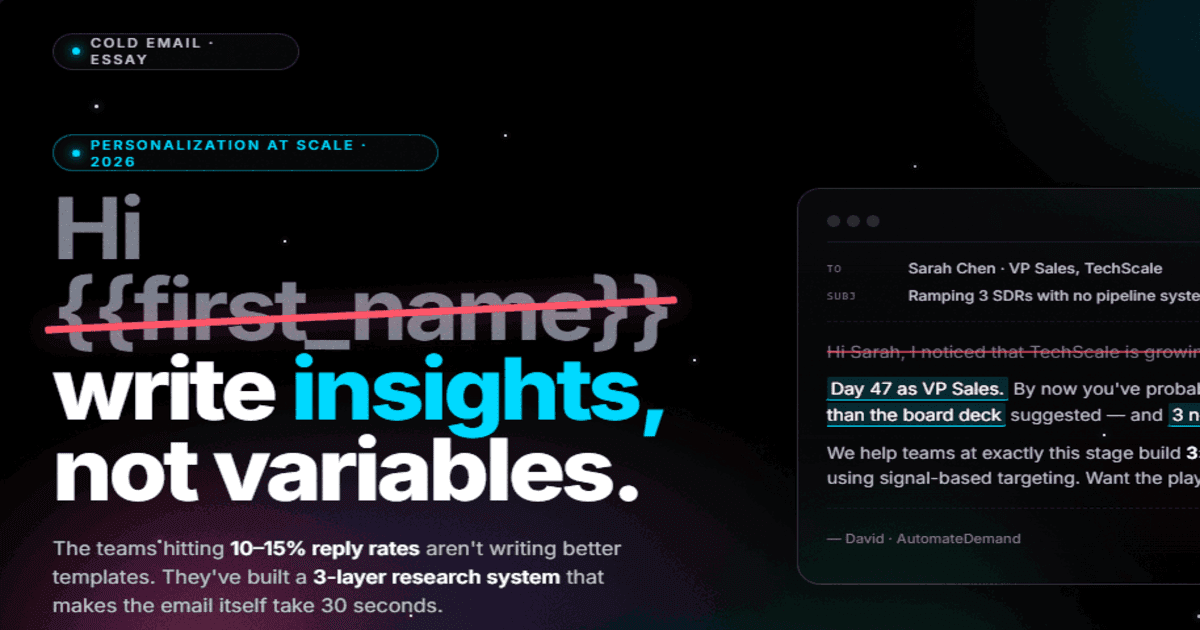
To achieve 10-15% reply rates at scale, transition from generic templates to a three-layer research system: automated signal detection, AI-assisted insight extraction, and human-verified message assembly. This process identifies business events like hiring or funding and connects them to specific pain points, proving relevance in under 80 words while maintaining high deliverability.
Key Takeaways
True personalization focuses on business insights and recent signals rather than superficial data like first names or company names.
A three-layer system—automated signal research, AI-assisted insight extraction, and human verification—enables high-quality personalization at scale.
Signal-based outreach reduces the cost per meeting by 3-4x compared to template-based outreach, despite higher initial costs per contact.
Cold Email Personalization at Scale: The System Behind 10-15% Reply Rates
Cold email personalization at scale sounds like an oxymoron. Personalization means research. Research takes time. Time kills scale.
That was true in 2023. It's not true anymore.
The teams hitting 10-15% reply rates in 2026 aren't writing better templates. They're running better research systems. The email itself takes 30 seconds to write when the research is already done. The research is what separates a 2% reply rate from a 12% one.
Average B2B cold email reply rates have dropped to 4-5% industry-wide. Google and Yahoo's sender guidelines now enforce strict spam rate thresholds. The era of mass-blasting generic emails is over. But the companies that cracked cold email personalization at scale are actually booking more meetings than ever, from fewer sends.
Here's the system they built.
Why Templates Don't Scale (Even Good Ones)
The template approach to personalization looks like this: write 5 email variants, add a {{first_name}} and {{company}} merge field, maybe include a {{industry}} variable, and call it "personalized."
It's not. And prospects know it.
According to Apollo's personalization research, a VP Sales receiving 120+ cold emails per month can spot a template in the first 3 words. "I noticed that {{company}} is..." reads exactly like what it is: a mail merge. The personalization isn't in the variable. It's in the insight.
The difference:
Template personalization: "I noticed that Acme Corp is growing fast."
Research-driven personalization: "Acme just posted 4 SDR roles after closing their Series B. That's usually the moment pipeline generation becomes the VP Sales' number one problem."
The first version tells the prospect you have their company name in a spreadsheet. The second tells them you understand their situation. One gets deleted. The other gets a reply.
The Three Layers of Cold Email Personalization at Scale
Layer 1: Signal Research (Automated)
The foundation. Before any email gets written, every prospect goes through an automated research pipeline that captures:
Company signals: Recent funding, hiring velocity, tech stack changes, leadership moves, product launches
Contact signals: Role tenure, LinkedIn activity, previous companies, published content
Pain signals: Industry benchmarks vs. their performance, competitor pressure, regulatory changes
This layer runs without human involvement. Enrichment tools pull data from 5-10 sources, cross-reference it, and produce a structured brief for each prospect. The output isn't an email. It's a research file.
The math: Manual research takes 15-25 minutes per prospect. Automated enrichment takes 3-5 seconds and costs $0.50-$2.00 per contact depending on the provider stack. At 100 prospects per day, that's the difference between 25-42 hours of human research and $50-$200 in tool costs.
Layer 2: Insight Extraction (AI-Assisted)
Raw data isn't personalization. "Company raised $15M Series A" is a fact. The insight is: "You're 60 days into a growth mandate with aggressive pipeline targets and a team that's still being built."
This layer transforms research data into actionable insights. For each prospect, the system identifies:
The most relevant signal (what's happening right now that creates urgency)
The pain implication (what problem does this signal create or amplify)
The connection to your value (how your product specifically addresses this pain)
The best signal-based outbound teams run this extraction automatically. The AI reads the research brief, identifies the strongest signal, and drafts the personalization hook. A human reviews and approves in 10-15 seconds per email.
Layer 3: Message Assembly (Human-Verified)
The final layer assembles the email. Not from a template. From components:
Opening line: References the specific signal (1 sentence, under 15 words)
Pain bridge: Connects the signal to a problem they're likely feeling (1-2 sentences)
Value statement: What you can do about it, specifically (1 sentence)
CTA: Low-friction ask (1 sentence)
Total email length: 4-6 sentences. 50-80 words. That's it.
The goal of cold email personalization isn't to write a long, impressive message. It's to prove in 3 seconds that you did your homework and that what you're offering is relevant right now.
The Research Stack: What You Actually Need
You don't need 15 tools. You need 4-5, configured correctly.
Function | What It Does | Example Tools |
|---|---|---|
Company enrichment | Funding, headcount, tech stack, news | Apollo, Crunchbase, BuiltWith |
Contact enrichment | Role, tenure, LinkedIn URL, email | Apollo, Cognism, Prospeo |
Signal detection | Hiring spikes, funding, tech changes | BuiltWith, LinkedIn, Crunchbase |
Research synthesis | Combine data into structured brief | AI layer (Claude, GPT) |
Email verification | Validate deliverability | ZeroBounce, NeverBounce |
The key architectural decision: run enrichment in a waterfall pattern, not parallel. Try your primary provider first. If it returns data, stop. If not, try the next source. This prevents paying for duplicate lookups and maximizes your fill rate while keeping costs at $1-3 per fully enriched contact.
Five Personalization Patterns That Convert
After analyzing thousands of cold emails across B2B SaaS campaigns, these are the personalization patterns that consistently produce 10%+ reply rates:
Pattern 1: The Signal-Pain Bridge
Structure: "[Specific signal] + [implied pain] + [relevant offer]"
Example: "Your team posted 4 SDR roles this month. Ramping that many reps simultaneously usually means pipeline generation is the bottleneck. We built a research system that gives new reps fully briefed prospects from day one. Can I show you how it works?"
Why it works: References something specific, implies understanding of the consequence, and offers something relevant to the implied pain.
Pattern 2: The Benchmark Gap
Structure: "[Industry benchmark] + [implied gap] + [specific help]"
Example: "The average Series B SaaS company runs 3.2x pipeline coverage. Most teams we talk to at your stage are running 1.8-2.2x. We help close that gap with signal-based targeting that finds buyers already in-market."
Why it works: Uses data to create tension without being accusatory. The prospect self-identifies if the gap applies to them.
Pattern 3: The Competitor Move
Structure: "[Competitor action] + [implication for prospect] + [differentiated offer]"
Example: "I noticed [Competitor] just launched an enterprise tier targeting your segment. When competitors move upmarket, pipeline pressure increases for everyone in the space. We help teams like yours build automated pipeline systems that run independently of competitive cycles."
Pattern 4: The Role Trigger
Structure: "[Role change observation] + [common challenge at this stage] + [specific resource]"
Example: "Day 47 as VP Sales. By now, you've probably inherited a pipeline that's thinner than the board deck suggested. We put together an analysis of how companies at your stage build 3x pipeline coverage in 90 days. Want me to send it?"
Pattern 5: The Math Problem
Structure: "[Specific calculation] + [quantified pain] + [quantified solution]"
Example: "At 200 outbound emails per day and a 2% reply rate, your SDR team generates roughly 88 replies per month. Our clients running signal-based outreach hit 12% reply rates from 40 daily sends. Same team, 4x the meetings, 80% less volume."
The Workflow: From Research to Send
Here's the exact workflow that processes 100+ personalized emails per day:
Step 1: Signal detection (automated, runs overnight)
Monitor ICP companies for new signals
Flag companies with Tier 1 or Tier 2 signals from the last 7 days
Queue flagged companies for enrichment
Step 2: Enrichment (automated, runs in sequence)
Pull company data (funding, tech stack, headcount, news)
Pull contact data (email, LinkedIn, role tenure)
Verify email deliverability
Output: structured research brief per contact
Step 3: Insight extraction (AI-assisted, 10-15 seconds per contact)
AI reads research brief
Identifies strongest signal and pain implication
Drafts personalization hook + full email
Human reviews, approves, or edits
Step 4: Send (automated, with deliverability controls)
Emails queue into sending tool with proper warm-up limits
Replies route to AI classification (positive, negative, objection, OOO)
Positive replies trigger immediate human follow-up
Throughput at scale:
1 person operating this system: 80-120 fully personalized emails per day
Traditional SDR doing manual personalization: 15-25 emails per day
Traditional SDR using templates: 150-200 emails per day (but at 2% reply rate)
The signal-based approach with 80-120 sends produces more meetings than the template approach with 200 sends. Every time.
What "Personalized" Actually Means (and What It Doesn't)
Let's kill some myths.
Personalization is NOT:
Using someone's first name
Mentioning their company name
Referencing their industry
Complimenting their LinkedIn profile
Saying "I saw you went to [University]"
Personalization IS:
Referencing a specific business event that happened in the last 30 days
Connecting that event to a problem they're likely experiencing
Quantifying the impact of that problem
Offering something specifically useful for their situation
The test: could you send this exact email to 100 other people without changing anything beyond the company name? If yes, it's not personalized. If the email only makes sense for this specific person at this specific moment, it's personalized.
Metrics and Benchmarks
After running this system across multiple B2B SaaS campaigns, here are the benchmarks:
Metric | Template Outreach | Signal-Personalized |
|---|---|---|
Reply rate | 3-5% | 10-15% |
Positive reply rate | 25-30% of replies | 50-60% of replies |
Meeting book rate | 1-2% of sends | 5-8% of sends |
Cost per contact | $0.10-$0.50 | $1.50-$3.00 |
Cost per meeting | $150-$300 | $40-$80 |
Time per email | 15 seconds | 10-15 seconds (review only) |
The cost per contact is higher. The cost per meeting is 3-4x lower. That's the only math that matters.
According to Instantly's analysis of cold email trends, the agencies still hitting 10-15% reply rates are sending to smaller, higher-intent lists with messaging that demonstrates they understood the prospect's business before writing a single word. That's exactly what this system does.
Common Mistakes in Cold Email Personalization at Scale
1. Over-personalizing. A 300-word email with 5 personalization points is worse than a 60-word email with 1 sharp insight. More personalization ≠ better. The right insight, delivered concisely, wins.
2. Personalizing the wrong thing. Referencing a company's founding year or their CEO's alma mater isn't personalization. It's stalking. Personalize around business pain and buying signals, not personal facts.
3. Skipping the verification step. AI-generated personalization is wrong 10-15% of the time. A human review step catches errors that would torpedo your credibility. The review takes 10 seconds. Skipping it costs you replies.
4. Treating personalization as a first-email-only tactic. Follow-ups need different personalization angles, not the same insight rephrased. Each touchpoint should reference a different signal or approach the pain from a different angle.
5. Ignoring deliverability. The most personalized email in the world doesn't matter if it lands in spam. As outlined in our cold email guide, warm-up your domains, authenticate with SPF/DKIM/DMARC, and keep sending volume under your reputation threshold.
FAQ: Cold Email Personalization at Scale
How much does the research stack cost per month?
Plan for $500-$1,500/month in enrichment and signal tools for a 1-person operation processing 2,000-3,000 contacts per month. The AI layer adds $100-$300/month. Total: $600-$1,800/month to produce 2,000+ fully personalized emails.
Can we personalize emails in languages other than English?
Yes. The same research system works for any language. The signal data is language-agnostic. The AI layer generates personalization hooks in any supported language. We run this system in both English and German for DACH markets with identical performance.
What's the minimum list size for this to be worth it?
Below 50 contacts per month, manual personalization is faster. Above 50, the automation pays for itself. The system really shines at 500+ contacts per month where manual personalization is physically impossible but template outreach underperforms.
How do we handle prospects who don't have recent signals?
Not every prospect will have a detectable buying signal. For those without signals, you have two options: wait (they'll eventually generate a signal) or deprioritize (focus resources on prospects with active signals). The worst option is sending a generic email to fill volume quotas.
Does this approach work with account-based marketing (ABM)?
It's the ideal approach for ABM. Signal-based personalization gives you 1:1 relevance for target accounts without the 45-minute manual research per contact. Run the system against your target account list, and every email reads like your AE spent an hour researching the company.
People Also Ask
What is the difference between template personalization and research-driven personalization?
Template personalization uses basic variables like company name, which prospects easily recognize as automated mail merges. Research-driven personalization uses specific business signals, such as recent hiring or funding, to demonstrate a deep understanding of the prospect's current challenges and needs.
How does automated signal research improve cold email performance?
Automated signal research identifies triggers like leadership moves or tech stack changes in seconds, replacing 15-25 minutes of manual human research. This allows teams to focus outreach on high-intent prospects, leading to reply rates of 10-15% compared to the 4-5% industry average.
What tools are needed for a cold email research stack?
A complete stack requires tools for company and contact enrichment like Apollo or Cognism, signal detection via LinkedIn or Crunchbase, and an AI layer like GPT for synthesis. Additionally, email verification tools like ZeroBounce are essential to maintain deliverability and prevent emails from landing in spam.
Why is human verification necessary in AI-assisted cold emailing?
AI-generated personalization can be incorrect approximately 10-15% of the time, which can severely damage a sender's credibility. A quick 10-15 second human review ensures the insight is accurate and the message is relevant before the email is sent.
FAQ
What is the ideal length for a personalized cold email?
The most effective personalized emails are concise, typically ranging from 4 to 6 sentences or 50 to 80 words. The goal is to prove relevance within three seconds by referencing a specific signal and connecting it to a business problem.
How much does it cost to run a signal-based personalization system?
For a one-person operation processing 2,000-3,000 contacts monthly, costs range from $600 to $1,800 per month. While the cost per contact is higher than templates, the cost per meeting is significantly lower, typically between $40 and $80.
Can this system be used for Account-Based Marketing (ABM)?
Yes, signal-based personalization is ideal for ABM because it provides 1:1 relevance for target accounts without the time-consuming manual research. It allows every email to read as if an account executive spent an hour researching the specific company.
What should I do if a prospect has no recent business signals?
If no detectable buying signal exists, you should either wait for one to be generated or deprioritize the contact to focus on higher-intent prospects. Sending a generic email just to meet volume quotas is the least effective option and should be avoided.
What are the most common mistakes in cold email personalization?
Common errors include over-personalizing with long messages, focusing on personal facts like alma maters instead of business pain, and ignoring deliverability basics like domain warm-up. Additionally, failing to use a human review step can lead to sending inaccurate AI-generated content.
How does signal-based outreach affect meeting book rates?
Signal-personalized outreach typically achieves a meeting book rate of 5-8% of total sends, compared to just 1-2% for template-based outreach. This efficiency means a single person can book more meetings with fewer sends by focusing on high-relevance insights.
TL;DR
Modern cold email success requires moving beyond basic merge fields to automated, signal-based research that identifies specific business triggers. By using a multi-layered system of data enrichment and AI-assisted insight extraction, teams can send highly personalized emails that achieve 10-15% reply rates at a lower cost per meeting than traditional methods.